
Blog
Mobile learning in the Classroom
27/05/2013 00:00The use of mobile learning in the classroom is a very broad concept. In summary, it is mainly the use of mobile phones (smartphones) in a class to complete or contribute to activities, with the permission of the teacher. Sharples states (2009, pg. 233) “..mobile technology can offer new opportunities for learning that extend within and beyond the traditional teacher-led classroom.” This account emphasises the potential mobile learning has. Sharples also reflects on the opportunity teachers have today to change the style of teaching. (2008, pg. 234)
“We are in an age of personal and technical mobility, where mobile devices, including phones, MP3 players and PDAs, are carries everywhere. We have the opportunity to design learning differently; linking people in real and virtual worlds, creating learning communities between people on the move, providing expertise on demand and supporting a lifetime of learning.”
Advantages of mobile learning include:
- Through the use of programs such as Skype (students can learn via distance education and still get class time.)
- In need of a quick reference/date/definition, students are able to search and access information in seconds.
- Class can be recorded/photos of the slides etc (can be taken for further study.)
- Students can write notes/work on projects on the go (Eg. On the train/bus/in the car)
- Promotes a healthier lifestyle – students have the flexibility to be outside while using their smart phone or device.
- Easy to collaborate a class’s work/knowledge onto a wiki/blog, creating a unique database of information for their use and advantage
- Allows ‘shyer’ students to communicate with the teacher/other students without having to speak, students can even choose to answer questions anonymously (avoiding the fear of being wrong in front of people.)
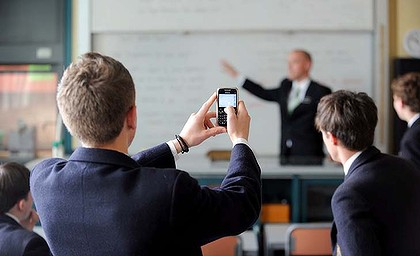
Disadvantages of mobile learning, as far as I can see include:
- It is easier for students to cheat (information at their fingertips)
- Students don’t learn to be resourceful and seek information further then the search results on their internet browser, missing out on the critical skill ‘process of elimination.’
- Depending on the school, teachers have limits as to how much they are able to communicate with students out of school
- Limited to the student’s resources and the teacher’s ability to construct successful mobile learning classes
Sharples outlines a disadvantage. (2009, pg. 237)
“ A central task in the design of technology for mobile learning is to promote enriching conversations within and across contexts. This involves understanding how to design technologies, media and interactions to support a seamless flow of learning across contexts, and how to integrate mobile technologies within education to enable innovative practices.”
Teachers must ‘understand how to design technologies, media and interactions’... the problem with this is the large amount of teachers not trained in technology, perhaps receiving their teaching degree before technology was seen as a key tool in education.
“This, the use of mobile technologies may only be suitable for part of the activity, with other parts being better supported by other technologies, or by no technology at all.” (Sharples 2009, pg. 237)
This following video clip, of a teacher over reacting at the use of a mobile phone in class is a classic example of how society in general has seen mobiles in the classroom in the past. It is interesting to note she is using ICT in the class, but the acceptance of technology had not gotten to the stage of acceptance of mobile phones.
https://www.youtube.com/watch?v=FjHWiIXOJ7k
I agree with Sharples. Mobile learning is an important strategy to implement in the classroom but it must be closely monitored in order to be of any benefit to the overall learning enhancement. Teachers need to be able to organise well-structured classes with mobile learning involved, and the students need to be at a level of maturity to understand the rules and restrictions that come with mobile and device use in the class. In my future experiences in the classroom, I will definitely make a big effort to use mobile learning, mainly in senior classes due to their higher level of understanding of the restrictions needed.
Here is a more positive video of how mobiles can be used. Note that it is being used in a university, being a more mature environment.
*Click the link below or scroll to the end of the page to watch the embedded video.
https://www.youtube.com/watch?v=NCQsnt3rDvk
What could a classroom sound like with mobile learning? Expect the buzz of silenced phones on the desks.
Cell Phone Table Vibration Sound Effect.mp3 (615549)
References:
Books:
Sharples, M., Arnedillo-S’anchez, Milrad, M., & Vavoula, G. (2009). Mobile learning small devices, big issues. In Balacheff et al. (Eds.), Technology-Enhanced Learning (pp. 233-249).
Images:
https://images.theage.com.au/2011/05/29/2393387/art-school-420x0.jpg

Videos:
Teacher throws phone on floor.
https://www.youtube.com/watch?v=FjHWiIXOJ7k
Positive use of mobile learning.
https://www.youtube.com/watch?v=NCQsnt3rDvk
Sound File:
(Converted to MP3)
https://www.youtube.com/watch?v=urkATNQVlo0
*The embedded videos are in the order that they are first mentioned.
ICT Current Trends
27/05/2013 00:00
Information and Communication Technologies have become a dominant feature in classrooms of the 21st Century. The current ICT tools being implemented include Interactive White Boards (IWB).
According to Jennifer Howell (2012, p 96) , Interactive White Boards are
“..a large interactive display that connects to a computer and projector. A projector projects the computer’s desktop onto the board’s surface, where users control the computer using a pen, finger, stylus or other device. The board is typically mounted to a wall or floor stand. They are used in a variety of settings, including classrooms at all levels of education, in corporate boardrooms and work groups, in training rooms for professional sports coaching, in broadcasting studios and others.”
There are mixed opinions on IWBs being used as a learning tool in the classroom. My personal opinion is that they are limited only with how far the teacher is willing and capable to go with it – limited to the imagination so to speak.
This video, a short film by SMART Technologies emphasises this.
*Click the link below or scroll to the end of this page to see the embedded video.
https://www.youtube.com/watch?v=dLdHbtuCIyY
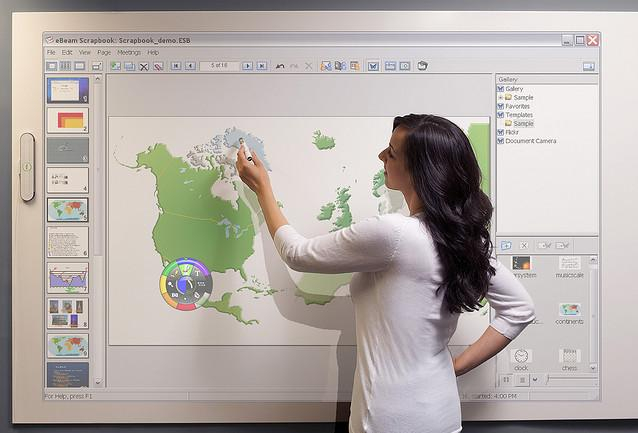
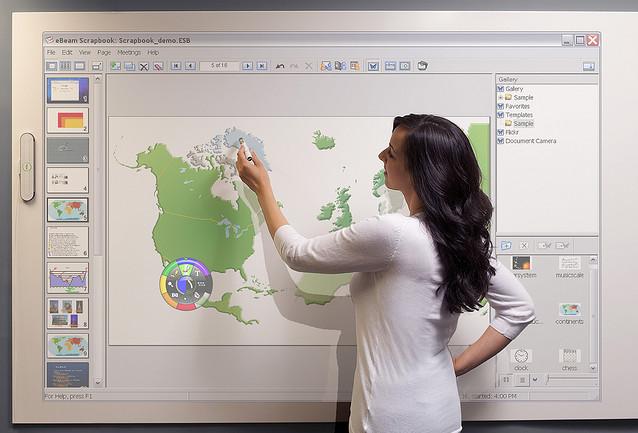
This picture is an example of an IWB. This specific activity, being most likely in a geography class labelling different countries is a huge component in this subject area. This is not only a more time efficient way of completing this activity, a more environmentally friendly option then paper handouts to fill in but it also has the advantage of being saved onto a hard drive to refer to later.
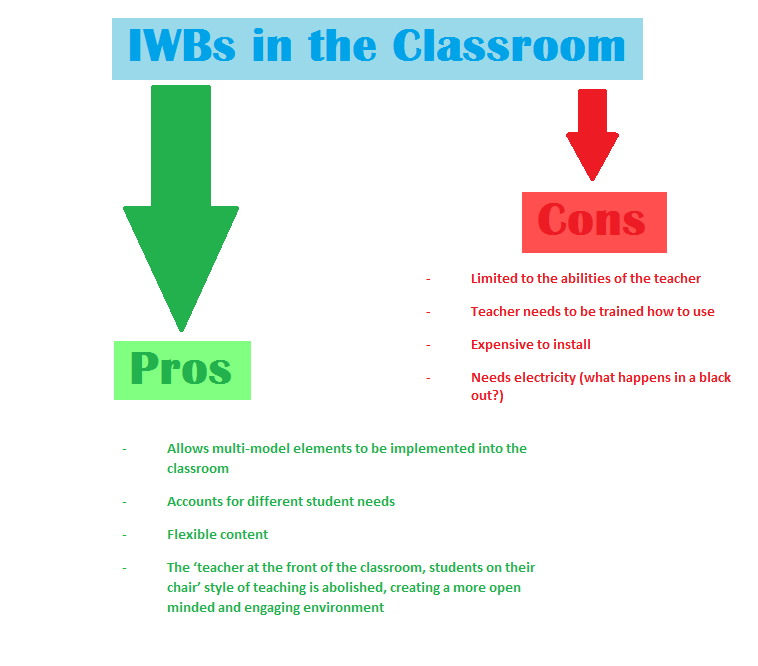
This concept map is a brief summary of some of the pros and cons I decided were involved when using interactive white boards.
Peter Kent (2010, ch. 3 ) reviews IWBs concisely.
“An IWB provides the class with content that can be easily manipulated. This provides you with a wide range of opportunities to lead rich class discussions, allowing students to think beyond memorising the content of the board to engage more deeply with the underlying concept being taught. “
Comparing IWBs to normal (traditional) white boards, Kent makes the following comment…
“In comparison, what is written on a traditional whiteboard is not very interactive. Once the content has been written on the board, the usual way to change it, to interact with it, is to rub out and rewrite something else. Reverting to the original content is often not possible without another process of erasing and rewriting. If you want to save what is on the board so that it can be used in lessons weeks and months into the future, forget it…"
Kent makes a very good point...the flexibility of IWBs is unlimited. Traditional white boards, being the alternative has no other use besides writing and then erasing. As many teachers would agree, conducting a class needs to have certain elements of flexibility. Topic investigation can take an unpredictable turn.
For example: In a history class, it could be planned to brainstorm key events in WWII. A student could ask who were the main political leaders involved, a legitimate question and an important aspect of WWII … what would a teacher using a normal white board do? They would explain the people involved, (eg. Adolf Hitler) to their best ability…. Why not through the use of an IWB jump onto Youtube and show the class a video of Hitler making a speech? This will increase student concentration, not all being responsive to verbal learning.
The possibilities - as I have previously stated - are endless.
This video below by Tom Hopper, a teacher in the US demonstrates again how IWBs work. At the end of the video, Tom states
“Today’s kids are used to more of an interactive lifestyle with multi-media screening.. videos…texting…youtube…this helps deliver the information in a way they are used to seeing.”
I agree with Tom.
*Click the link below or scroll to the end of this page to see the embedded video.
https://www.youtube.com/watch?v=DjdNPMZJbLs
As an undergraduate student studying to become a teacher in 2016, I think IWBs are a great idea. In my high school I was lucky enough to have IWBs, experiencing firsthand the advantages and disadvantages of them. The main disadvantage that I have observed is that the teacher needs to know how to use them, many just using it as a projector and not fully comprehending how far you can go with Interactive White Boards. I would definitely use IWBs in my classroom in the future.
In conclusion, the main current trend being Interactive White Boards at the moment is a useful facility for the classroom. If the teacher is capable of using it and pushing it past the boundaries, positive results will flourish.
References:
Books:
Kent, P. (2010). Secondary Teaching with Interactive Whiteboards. Melbourne: Macmillan Digital. Chapter 3 (pages 1 - 2).
Howell, J. (2012). Teaching with ICT: Digital Pedagogies for Collaboration and Creativity. South Melbourne: Oxford University Press. (p. 96)
Videos:
SMART Technologies
https://www.youtube.com/watch?v=dLdHbtuCIyY
Tom Hopper
https://www.youtube.com/watch?v=DjdNPMZJbLs
Images:
Geography Lesson
https://www.ebmltd.co.uk/wp-content/uploads/interactive-whiteboards-essex.jpg
The videos below are in the order that they are first mentioned.
Wikis and collaborative learning
27/05/2013 00:00Wikis in the classroom are a new concept being explored by teachers today. In the simplest form, wikis are a space on the internet where a person can put content that can then be added to/edited by other users. Collaborative learning, being the contribution of more than one person into the learning/education is the overall aim of using wikis in a class. As demonstrated through the following video.
*Click the link below or scroll to the end of this page to see the embedded video.
https://www.youtube.com/watch?v=1pR5yogCmkA
An easy way to understand what a wiki visually, is through the following concept map. A website is created, and various ‘authors’ contribute to the content entering their work into the ‘wiki engine.’
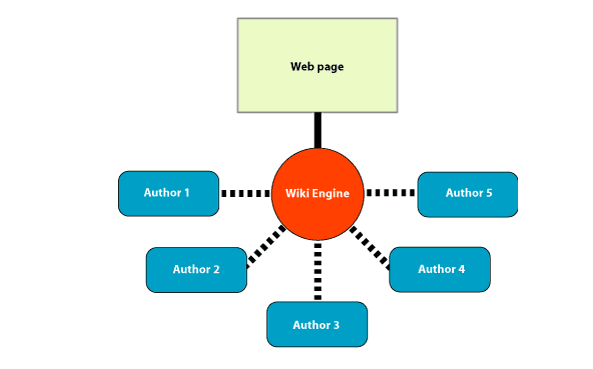
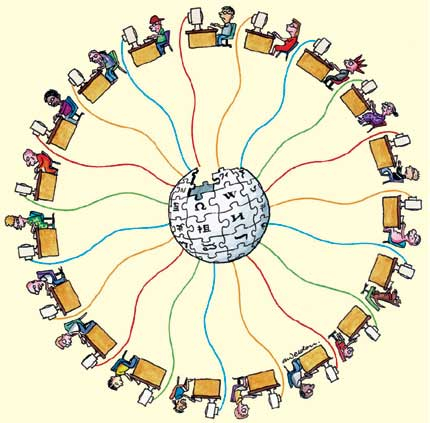
There are many potential ways to use wikis in the classroom for each subject taught in the classroom, as well as outside the classroom in a home environment. (eg. Assigned homework, assignments) Wikis connect students with each other, in a way that a normal class cannot. This allows students that might not feel comfortable voicing their opinions in front of everyone to ‘find their voice’ so to speak.
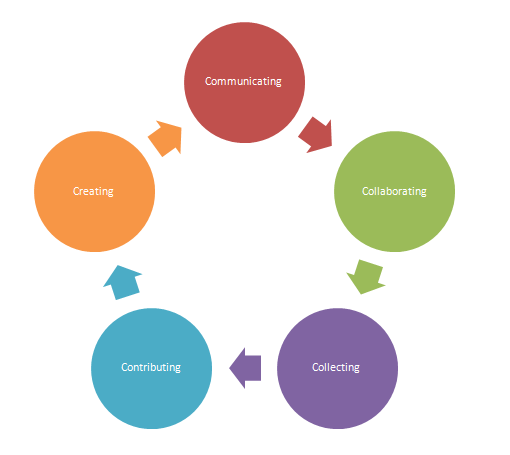
The main problem that I can see with using wikis for a class is that there is a certain amount of discipline needed to make sure that commenting on other students work for example does not get out of hand, or that the students are not distracted/do not waste too much time talking online to each other without focusing mainly on the content. (Getting stuck at the ‘communicating’ stage seen below.)
Howell (2012, p. 142) makes an important point. “We do need to be open and enthusiastic educators, who embrace and do not resist technology. That is the mindset we can all adopt.”
I strongly agree, technology and all that it holds such as collaborative learning through wikis needs to be accepted by teachers and embraced. Negativity towards using new programs and learning strategies such as collaborative learning instead of the traditional classroom learning (see the video below for an example of this) needs to be replaced by enthusiasm and open-mindedness.
*Click the link below or scroll to the end of this page to see the embedded video.
https://www.youtube.com/watch?v=EQKcxnFUMxk
As you can see, there is absolutely no student input in extreme traditional teaching. It is important to present content to students, and it is appropriate to do so in the above manner WITH the assistance of technology and tools such as wikis.
In summary the main advantage of using wikis in the classroom is that it engages students and encourages individual input. One of the only disadvantages of this style of collaborative learning is that it needs to have strict supervision (taking extra time) and the teacher needs to feel comfortable with using this level of technology before applying it to their classroom (which may require them to devote extra time to familiarise themselves with the software etc.)
I would definitely use wikis as a way to promote collaborative learning in my classroom when I become a teacher, having been given the chance to use them and to experience the advantages to them when I was a secondary student.
References:
Books:
Howell, J. (2012). Teaching with ICT: Digital Pedagogies for Collaboration and Creativity. South Melbourne: Oxford University Press. (p. 96)
Videos:
Wikis in the Classroom
https://www.youtube.com/watch?v=1pR5yogCmkA
Traditional Classroom
https://www.youtube.com/watch?v=EQKcxnFUMxk
Images:
Concept Map on wikis
https://recap.ltd.uk/Resources/wiki1.gif

Wikis connecting students worldwide
https://newwaysteaching.wikispaces.com/file/view/wiki_universo.jpg/151262601/wiki_universo.jpg

The Wiki Cycle
https://enc1101-56.wikispaces.com/file/view/New_wiki_wheel.png/192240012/New_wiki_wheel.png

The videos below are in the order that they are first mentioned.
Digital Storytelling
27/05/2013 00:00Digital storytelling is not a new concept in classrooms. Schools have implemented digital stories into the education process, through tools such as PowerPoint for many years. Howell (2012, pg.94) demonstrates what digital storytelling is exactly.
“What is a digital storybook? A digital storybook is essentially a collection of digital images, placed in a particular order to tell a story, which is accompanied by an audio narration. The simplest way to envisage a digital storybook would be via the programs PowerPoint or MovieMaker. It is a mini-movie that is made out of images. It can have text accompanying it but, most simply it is a purposefully crafted movie. They are quite powerful tools, as they can tell a story of a shared experience or a special event…”
Digital Storytelling is generally accepted by most audiences, especially those of today that are used to the integration of technology into class. Here is an example of digital storytelling, this video being aimed at a pre-school audience. By using digital storytelling to present young children with fables (stories), it enables them to go through their whole schooling life without being daunted about the widely expanding technology. (Being introduced to it at a young age.)
*Click the link below (was unable to embed this particular video)
https://www.youtube.com/user/hooplakidz?v=5eh2NU0mjrc
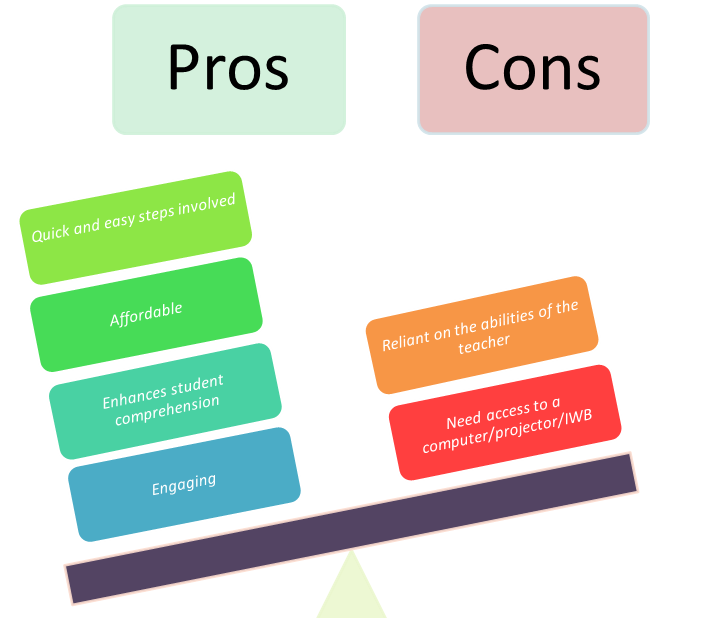
The pros of digital storytelling, far outweigh the cons. Here is a diagram I made to demonstrate this.
The way digital storytelling is being used in classrooms is broad.
A few examples include:
- Using Claymation to create stories for an English class (cartoon Shakespeare play?)
- Moviemaker to create a short film in a media class
- Using PowerPoint or another similar program to give students a step by step method in a scientific experiment
- In a theory class for sport, a teacher could play videos of old games (football matches for example) to demonstrate to the students what worked well/what didn’t (strategizing etc)
And so the list could go on..
Robin (2008, pg. 222) makes many good points about digital storytelling.
“A multimedia-rich digital story can serve as an anticipatory set or hook to capture the attention of students and increase their interest in exploring new ideas. Teacher-created digital stories may also be used to enhance current lessons within a larger unit, as a way to facilitate discussion about the topics presented in a story and as a way to make abstract or conceptual content more understandable.”
It is important that students participate in the creation of digital storytelling, Robin (2008, pg 224) “As they do so, students develop enhanced communication skills as they learn to conduct research on a topic, ask questions, organize their ideas, express opinions, and contruct meaningful naratives.”
Below is a cartoon of a class contributing to the creation of a digital story.
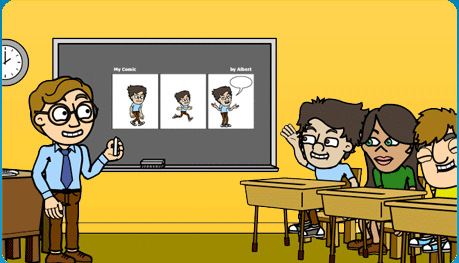
In my own personal experience of digital storytelling in the classroom, I believe that this is a useful and creative tool to use. In my senior biology class my teacher asked us to construct a digital story and then present our finished project to the class outlining different processes in the DNA construction. This class was not only fun but also very engaging and fresh, everyone learning to interpret information into a presentation and also to develop good communication and presentation skills. These skills cannot be learnt through reading a textbook or listening to a teacher. I will definitely use digital story telling in my future classes when I become a teacher.
References:
Books:
Howell, J. (2012). Teaching with ICT: Digital Pedagogies for Collaboration and Creativity. South Melbourne: Oxford University Press. (p. 222-224)
Robin, B.R. (2008). Digital storytelling: A powerful technology tools for the 21st century classroom. Theory Into Practice, 47: 220 - 228.
Videos:
The Lion and the Mouse
https://www.youtube.com/user/hooplakidz?v=5eh2NU0mjrc
Images:
Cartoon
https://najariantechlit.wikispaces.com/file/view/bit.png/359197921/bit.png

Social Contructivism
27/05/2013 00:00Social Constructivism, to my understanding is a theory/way of teaching or learning that goes against the traditional ways. It is being used in education facilities, but has still a long way to go before it can be seen as the most used theory/strategy. This way of teaching or learning is best characterised in Yilmaz’s report (2008, pg. 169) “Teachers facilitate and guide rather than dictate autocratically.” Basically, this means that instead of the student just listening and absorbing what the teacher is saying, they also contribute to the learning through questions and collaboration. “In the constructivist classroom, learning emphasizes the process, not the product. How one arrives at a particular answer is what matters.” (Yilmaz 2008, pg. 170)
A man named John Abbott discusses constructivism concisely.
*Click the link below or scroll to the end of the page to see the embedded video.
https://www.youtube.com/watch?v=F00R3pOXzuk
Abbott suggests that a good teacher is one that takes what a student already knows and builds upon it. This is a good way of teaching IF the student has prior knowledge on the topic. A good example is in a primary school – in the early grades the students will learn how to add and subtract numbers, and how to spell simple words such as ‘dog’ and ‘cat.’ When they reach higher grades, the teacher will then teach them how to multiply and divide, and to spell harder words – adding onto what they already know. Another element to this strategy is the emphasis on the process to get the answer/result rather than the emphasis on the end result primarily. This reminds me of when I was at high school when in maths (both junior and senior) the teachers would tell us to show ALL working out and when being assessed, if we got the end answer wrong but all or most of the working out right we would still get a partly correct mark. This is a god way to teach, but the what if the student does not have prior knowledge?

Although it is very popular in western society, there are still many factors that suggest it still needs to be improved before being given primary position over other teaching strategies. Rowe (2006, pg. 2) states,
“..there is a strong body of evidence that exclusive evidence on constructivist approaches to teaching are neither initially nor subsequently in the best interest of any group of students, and especially for those experiencing learning difficulties..”
This is a VERY important factor to consider when choosing whether social constructivism is the right way to teach students. “..students engage in raw data or primary sources, aiming to develop students cognitive and higher order thinking skills.” (Yilmaz 2008, pg 170)
I present this question: What if the student is not at the level to have high order thinking? What if students are unable to easily engage?
These are the problems arising with social constructivism.
Rowe also states that this way of teaching and educating is most difficult for children from non-English speaking backgrounds. (2008, pg. 2) Further reading of Rowe’s report reveals that there is strong evidence of the limitations of exclusive constructivist methods of teaching. (pg. 3) An important word to note here is exclusive – perhaps with other methods implemented also, it could have a higher success.
“The key element of constructivism is that the learner is an active contributor to the learning process, and that teaching methods should focus on what the student can bring to the learning situation as much as on what is received from the environment….. Hence, the role of the teacher is to be the facilitator of learning (rather than a director or an orchestrator), and to provide opportunities for individual learners to acquire knowledge and construct meaning through their own activities, and through discussion, reflection and the sharing of ideas with other learners with minimalcorrective intervention.” (Rowe 2008, pg. 3)
The advantage of social constructivism is the allowance of student to student interaction and student to teacher input rather than just a teacher to student input into the learning process. The disadvantage to this is that there is a danger that the student will share with fellow peers misleading information, as well as the isolation of students with a minimal knowledge of the topic or learning disability.
When I become a teacher I will implement both the traditional teaching method as well at the constructivist method into my daily teaching. Until better strategies are created to account for student with learning disabilities while using a social constructivist method, I believe that it would be unfair and wrong to put emphasis on the prior knowledge of students without any aid. In future I can see this method being highly successful, with the improvement of accessible resources and technologies and developing theories to account for individual learner’s needs and abilities, and look forward to using it primarily when that time comes.

References:
Books:
Rowe, K. (2006). "Effective teaching practices for students with and without learning difficulties: Constructivism as a legitimate theory of learning AND of teaching?"
Yilmaz, K. (2008). Constructivism: Its Theoretical Underpinnings, Variations, and Implications for Classroom Instruction. Educational HORIZONS. p. 161 – 172.
Videos:
John Abbott
https://www.youtube.com/watch?v=F00R3pOXzuk
Images:
No prior knowledge
https://www.washingtonpost.com/blogs/answer-sheet/files/2013/03/math.jpg

Learning disabilities
https://nspt4kids.com/wp-content/uploads/2011/02/boy-in-classroom.jpg

Assessment Using ICT
27/05/2013 00:00Using ICT for assessment in the classroom is an innovative way of increasing student engagement in a flexible and creative way. Examples of various forms of ICT that can be used and manipulated for assessment and student interaction include; blogs, wikis, Twitter, Facebook, Google Maps, Google Earth, YouTube and Google Apps. (Campbell 2013, pg34 – 40)
A few examples of how ICT can be used to assess student progress:
Online educational games – students able to play them according to the level they are comfortable at. For example, this maths online game allows students to pair numbers with the matching number that will equal 10.
https://www.knowledgeadventure.com/games/math-lines.aspx
Other examples include:
- Using blogs instead of school books to record school work,
- Online quizzes (able to put a timer on the answering of each question),
- Multi-modal presentations (I did a lot of these at school and found them very helpful in learning about the topic),
- Group assignments (group members are able to communicate outside of the class via programs such as Skype, Facebook, email, messenger etc),
- Photo stories (students are usually required to complete a project that talks about themselves – in primary school I had to do one on a poster – a much more engaging way to do this would be to do a short video or photo story using programs such as MovieMaker or PowerPoint) and
- Offline educational games/programs such as the many touch typing programs people can access – students each having a profile to work on.
Advantages of ICT for assessment are broad. If a student is away, they are still able to complete tasks such as online quizzes/games etc, when a teacher is away they can prepare and organise the lesson so that the students are not at a disadvantage (eg. Pre-record a class/prepare a presentation beforehand), there is a great amount of flexibility according to each individual student’s needs and there is unlimited resources – teachers literally have the entire world to play with.
Campbell (2013, pg. 34) “One of the most effective ways to improve student learning is to use technology in both teaching and assessment.”
Disadvantages are that many teachers are inconsistent in their use of ICT for assessment, meaning that it can still be daunting for students that are not used to the software. Also, it is limited to the school and students resources – what if the students cannot afford a laptop or the school does not have compatible software?
The disadvantages I have mentioned are not permanent, the more technology grows the more schools and homes will also.
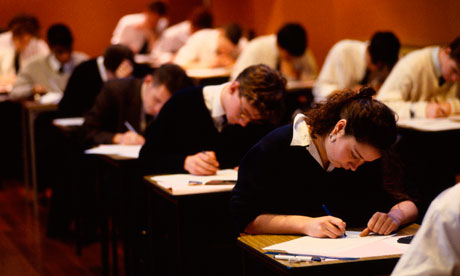
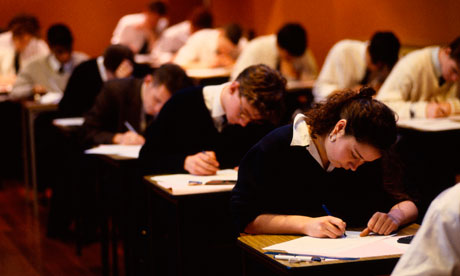
Traditional Assessment.
Assessment using ICT.

Here is a short video clip of a student using an Ipad to complete an activity. Notice that he is 100% engaged with the activity and that with scenarios such as this one, there is no risk of other students copying the work of another.
*Click on the link below or scroll to the end of the page to see the embedded video.
https://www.youtube.com/watch?v=v5GKnfuKFZ4
I think there is no option whether to use ICT in the classroom for assessment or not. It is CRITICAL that students are taught to use ICT in assessment, giving them important skills that they will carry with them for long after school ceases. I will definitely be going to a great effort to include as many types of ICT in the assessment of my future students as possible, depending on the limitations of the school and circumstances.
References:
Books:
Kent, P. & Campbell, C. Technology for Assessment. Chapter 5 in Assessment for Teaching Today: A guide to assessment strategies and activities. Sydney: Macmillan.
Videos:
Ipads in the classroom
https://www.youtube.com/watch?v=v5GKnfuKFZ4
Images:
Traditional Assessment
https://static.guim.co.uk/sys-images/Guardian/Pix/cartoons/2012/6/20/1340194927119/students-taking-exams-008.jpg
Assessment using ICT
https://studentwire.co.uk/wp-content/uploads/2013/05/PowerPoint-13803856.jpg

Online Game:
Tags
The list of tags is empty.